Friday, 21 January 2011
Post 12 - Phase One: Mesh Creation
ZSphere to Adaptive Mesh
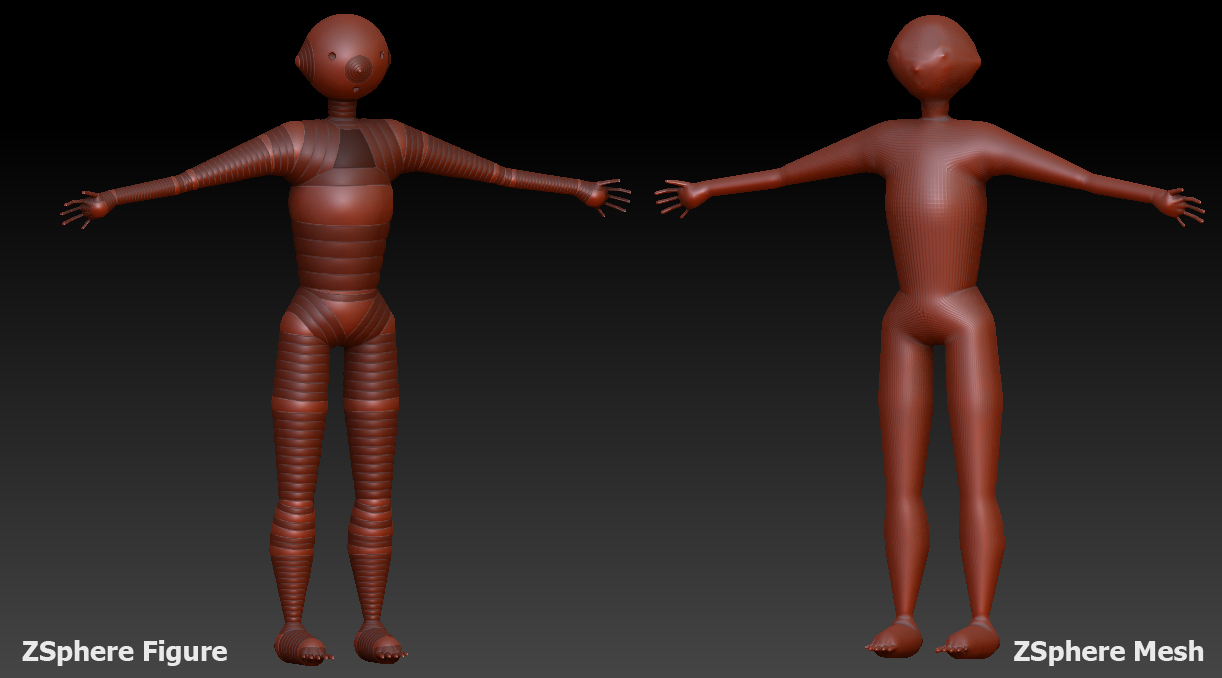
I have begun the creation of my base mesh. Although the DVD: Character modeling for Next - Gen Games (mentioned previously) was useful, the tutor Richard Smith uses a base mesh from Autodesk's Maya. I am not particularly familiar with this program, plus I have decided to make the initial mesh out of what are called ZSpheres. Using the book: ZBrush Digital Sculpting Human Anatomy, the second chapter describes the process of making the mesh out of these ZSpheres. It seems quite straight forward and so far has gone ok. Once I made the figure, I then created an adaptive skin. This topologies the zspheres and makes an approximate mesh out of the initial shape.
This is a good bases to start trying my hand at some sculpting. The book mentions the tools 'Standard' and 'Move' to make the mesh more like a human figure. So far I am pleased with the outcome and seems to make sense. No issues so far with ZBrush.
Wednesday, 19 January 2011
Post 11 - Gnomon Workshop DVD Resource
I have borrowed several DVDs from the Leeds Metropolitan University library. Their subject matter covers predominantly ZBrush, specifically its use in creating characters and full figure models. These were published by the Gnomon Workshop, a well known and reputable publisher of educational products aimed at 3D Software.
They are titled as follows:
Character Modeling for Next - Gen Games: Modeling and Sculpting with Richard Smith
Character Modeling in Maya and ZBrush: The Making of Jester Vol One
Character Texturing and Rendering: The Making of Jester Vol Two
Character Modeling for Next - Gen Games: Modeling and Sculpting with Richard Smith
Character Modeling in Maya and ZBrush: The Making of Jester Vol One
Character Texturing and Rendering: The Making of Jester Vol Two
Although at this stage it would be naive to think that I could do all tutorials and tasks featured in these DVDs, but they certainly will help with techniques, strategies and work flow when constructing base meshes. I have used some of the tips suggested in the first DVD so far such as how to approach a project and strategies.
Saturday, 11 December 2010
Post 10 - ZBrush Books
A book that I have recently been looking at is a book on ZBrush entitled: ZBrush Character Creation: Advanced Digital Sculpting, written by Scott Spencer, published by Sybex in 2008.
This looks like a great book and has a gradual learning curve as starts with the fundamentals of form, and emotion conveyance.
It is called: ZBrush Digital Sculpting Human Anatomy, also written by Scott Spencer, published by Sybex in 2010.
At first glance, this is a very interesting read and have already been using it to begin making a base figure mesh for my task three of my 3D Technology module.
Character Creation Link - http://www.sybex.com/WileyCDA/SybexTitle/ZBrush-Character-Creation-Advanced-Digital-Sculpting.productCd-047024996X.html
Human Anatomy Book Link - http://www.pixologic.com/blog/2010/01/zbrush-book-digital-sculpting-human-anatomy-by-scott-spencer/
Thursday, 2 December 2010
Post 09 - ZBrush Research
I have begun to research the digital sculpting software ZBrush, made by Pixologic. The sources for this research are mentioned in another one of my blogs and can be accessed by using this link.
However, these links can also be found below with a brief overview of them.
This website is great as it is updated regularly and is hosted by the creators of ZBrush. It includes interviews, case studies, examples of work as well and tutorials and hints and tips. I am currently going through the video tutorials.
A great online and printed magazine, which also features interviews (currently following the work of Cedric Seaut), case studies and tutorials. This website also provides free models, something which I am taking advantage of in my 3D Animation module)
This is a large magazine, which has been published exclusively on ZBrush. This includes a DVD which has over 20 tutorials on it, with over 10 hours of videos. This was published in November and will b of great help.
This website has been very useful and also contains many video tutorials for ZBrush. It covers similar ground to that of the Pixologic website, but as they are different tutorials, its always good to see how other people navigate and use the software.
At this stage, there seems to be a a lot of research into the modelling, sculpting sector, with relevance to games as this is what I am interested in. Animation is also an interest of mine, so some more research should be done in this area also.
I wish to soon look into a couple of case studies.
Links:
Pixologic website: http://www.pixologic.com/zclassroom/
3D Total website: http://www.3dtotal.com/
3D World - ZBrush Essential 'bookazine': http://www.3dworldmag.com/2010/10/21/zbrush-essentials/
CG.tutplus - ZBrush additional tutorials: http://cg.tutsplus.com/articles/web-roundups/tutorial-roundup-82-earth-shattering-zbrush-tutorials/
Friday, 12 November 2010
Post 08 - 10 Minute Talk & Vimeo clip
I have just completed the my Task One, which was the 10 Minute talk. I think it went well, but I was aware that some of it was scripted (due to the quantity of information I found) As I didn't want it to go over, I was reading at an 'efficient rate'
Also, I have just found this animation, which has a very interesting character in it entitled 'no shi da'. It is very stylish and caught my eye. This may be one of the areas of inspiration I use for my task three as it looks like it could be sculpted using digital clay.
Character Vimeo link - http://www.vimeo.com/groups/1661/videos/14269481
Monday, 8 November 2010
Post 07 - ISSUU Task Two
Here is a link to a brief web publication I have made for Task two. It is a brief summary of the research and Work I have done for the first 7-8 weeks, which applies to task one and task two.
ISSUU Link: http://issuu.com/rob_dyke/docs/3d_tech_task_two
Here is also the latest developments of the figure I have been working on using the retopology technique.
Wednesday, 3 November 2010
Post 06 - Presentation & Retopology
Since the session last Thursday, I have been practicing a technique shown to me by our session tutor for creating a low poly mesh in 3Ds Max from a Mudbox human figure model. This process is very interesting as it allows for a high poly figure or model to be created, then a low poly copy of it can be produced by using various tools from the Graphite and Freedom drop down tool bar. I have so far completed the head, as can be seen in this image.
The process of retopology is one which I will look into with more detail in my research report, which is task two and should feed nicely into my task three. Task three at this stage will be to create a game ready, or highly detailed games ready character. This may be sculpted in Mudbox, then recreated in 3Ds Max to lower the poly count. This will then be used in conjunction with my 3D Animation module and animated in a variety of ways.
I have also recently completed my task one (ten minute technology presentation) and have used the presentation software, Prezi to do this. I have still yet to run through and practice it for timing so apart from being subject to shortening, it is finished. This is due next week.Prezi Presentation - http://prezi.com/dtbjerxr0qp_/3d-technology-task-one-presentation/
Subscribe to:
Posts (Atom)


